
Innovation and Inspiration for Developers:
Satori RealFitness
Industry: SaaS, B2C, B2B, Healthtech Platforms: iOS- iPhone and Apple Watch
Team: 1 PM, 1 Engineer
Highlights
Driving inspiration to executive and user adoption
Pioneered integration of biometric data in wearable design, validating the concept through research and stakeholder feedback, ultimately securing executive buy-in for development.
Spearheaded cross-functional alignment between design, product, and engineering teams.
Led end-to-end design, translating complex health and sensor data into a clear, accessible user experience while balancing small-screen constraints with real-time feedback needs.
Impact
7% increase in user engagement
3% increase in account sign-ups
Increased demonstration of technological capabilities
Background
Satori is a live-streaming data platform designed for rapid integration, real-time interaction, and data correlation with ultra-low latency. It provides SDKs, APIs, and a Live Messaging service that enable applications to publish live streaming data or subscribe to feeds from an open library of data channels. The platform also includes Live Discovery tools for data shaping and analysis. Additionally, bots could be used to embed custom logic directly into data streams through the Live Reactions feature.
Problem
Leadership was concerned that developers (our target audience) might struggle to understand how to use Satori’s technology, and emphasized the need to attract early adopters.
Opportunity
How might we innovate and inspire developers with our technology?
Business Goals
User Adoption - How might we increase the number of sign-ups?
User Engagement - How might we get more activity on the site?
Bootstrap - How might we help set up our users for success?
Brainstorming and gathering data
Following a collaborative brainstorming session, I led the exploration of a novel concept integrating the Real-time technology with biometrics. To ensure strategic alignment and reduce risk, I facilitated stakeholder and developer interviews to validate the idea before moving forward with further investment.
“We want to make it easy for our users with a simple, extensible and scalable with a simple out-of-the-box solution that provides all necessary APIs and SDKs in the browser.”
“As a developer, part of my process is to use a sandbox where I can test things out.”
“I won’t go running without using a Wearable. I need to know my heart rate especially since I’m training for a marathon.”
Competitive Analysis
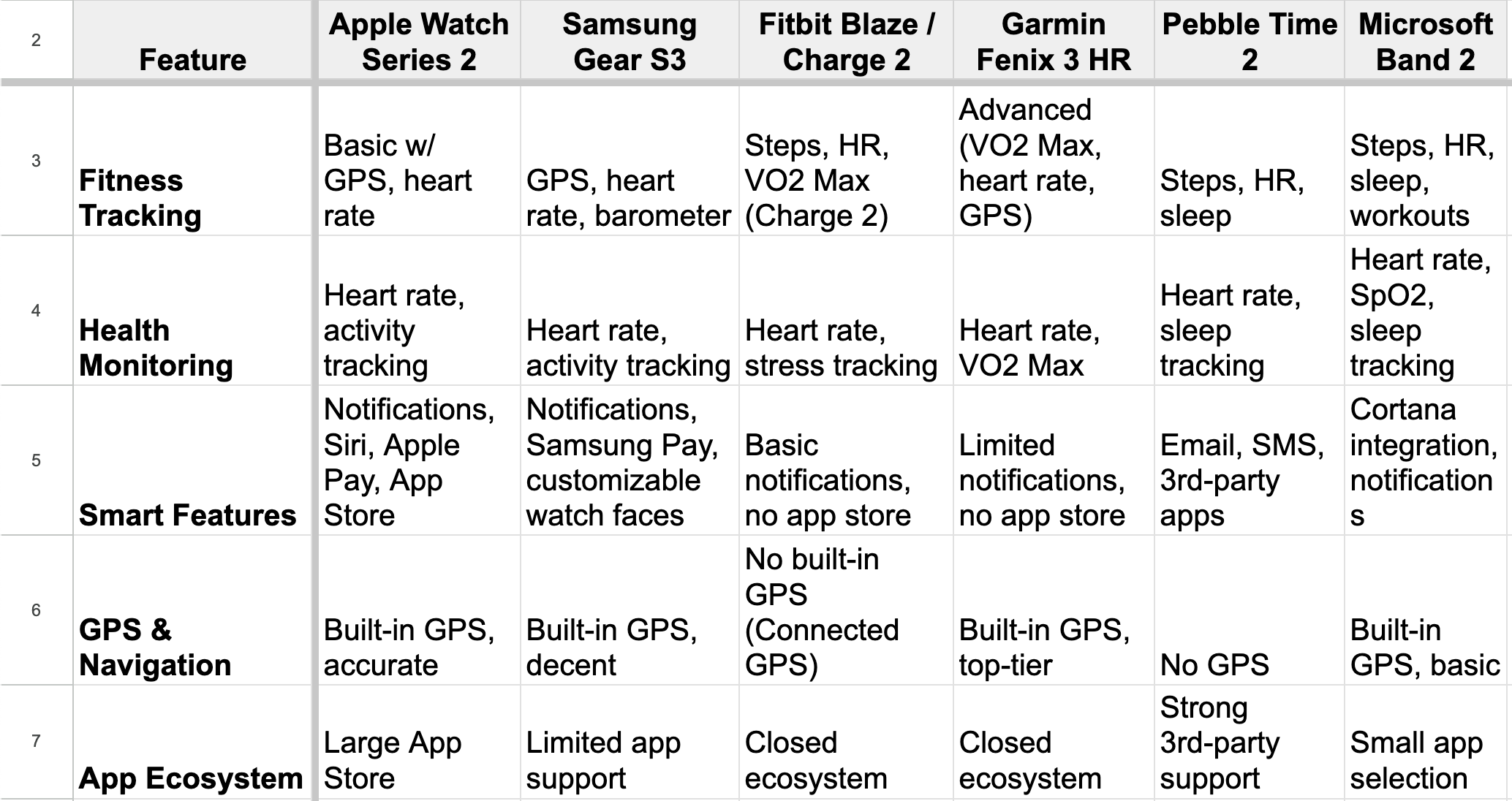
To inform strategic decisions, I led a competitive landscape analysis of the wearable tech space across iOS and non-iOS platforms.
Questions I used the facilitate the inquiry:
What features do they offer?
Specific flow? Visual Design/ treatment?
How do they integrate with the app ecosystem?
What do we personally find superfluous?
Requirements
After synthesizing the research, I ran a quick whiteboarding exercise with the team that helped highlight key user requirements to align the MVP with user needs, business goals, and priorities.
Needs/ MVP
See running activity (distance, calories, time elapsed)
Stop and pause
Recent activity/ History
Sync to Apple Health
Nice to Haves
Map of distance traveled
Average distance/ time
Sync to social media
Notifications
In-app messaging to friends
Challenges to join
User Delight
Animation
Color
User flow
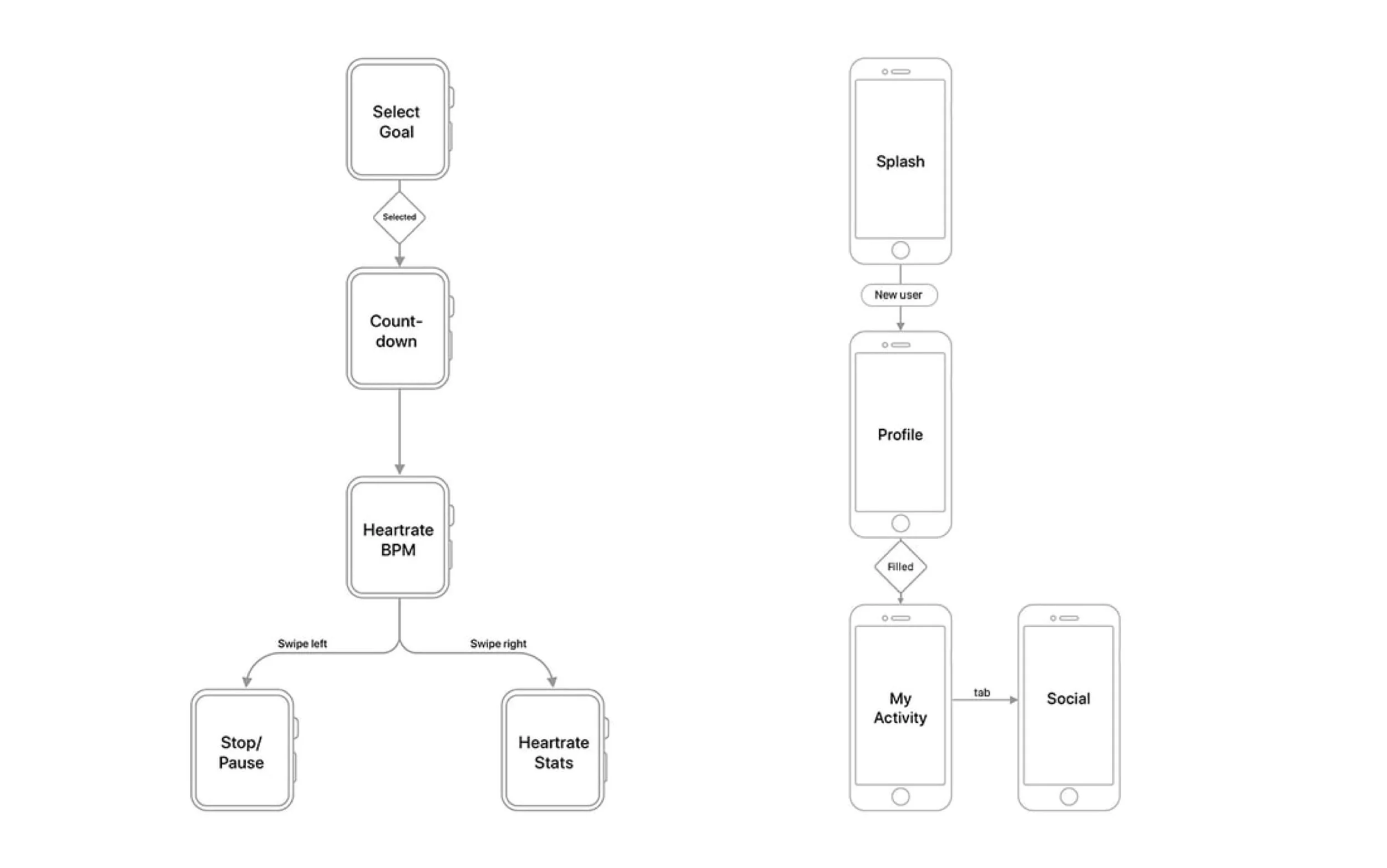
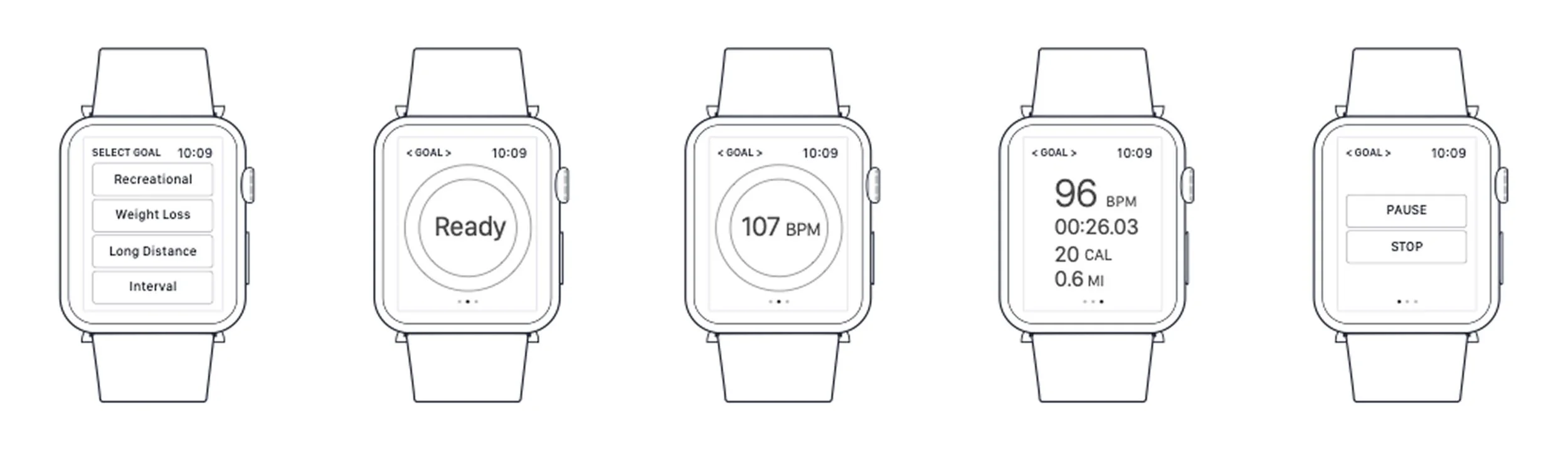
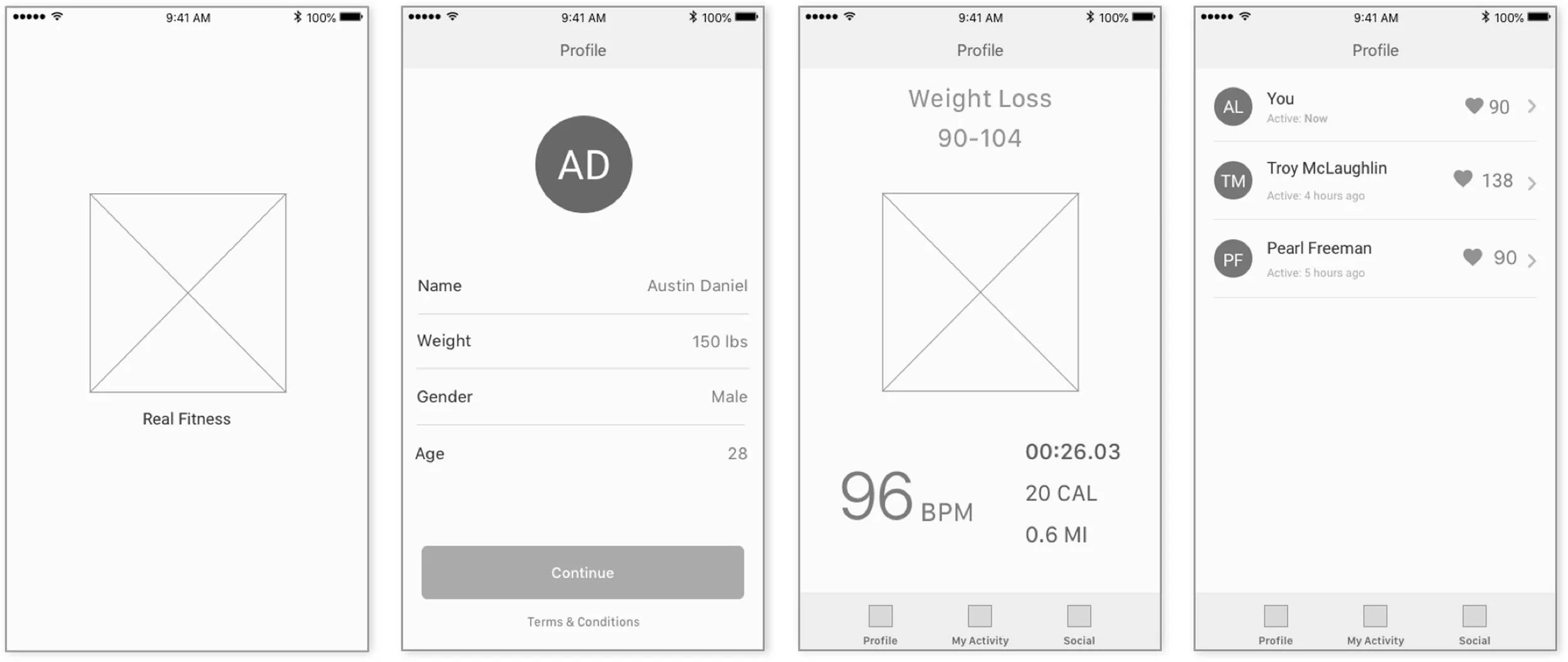
Faced with a tight turnaround, I prioritized and scoped features for the MVP, strategically starting with the wearable experience to address the constraints of limited screen real estate. I then designed the iPhone companion experience to complement the wearable, leveraging the larger screen to enhance usability and functionality.
Wireframes
App icon ideation

Usability Testing
Main Takeaways
Simplicity wins on the wrist
Users wanted minimal interaction: “start,” “pause,” and clear metrics, especially during runs or high-intensity workouts.
Overly complex navigation led to frustration.
Real-time feedback must be glanceable
Users expected large, readable metrics like heart rate at a quick glance, without needing to swipe or scroll.
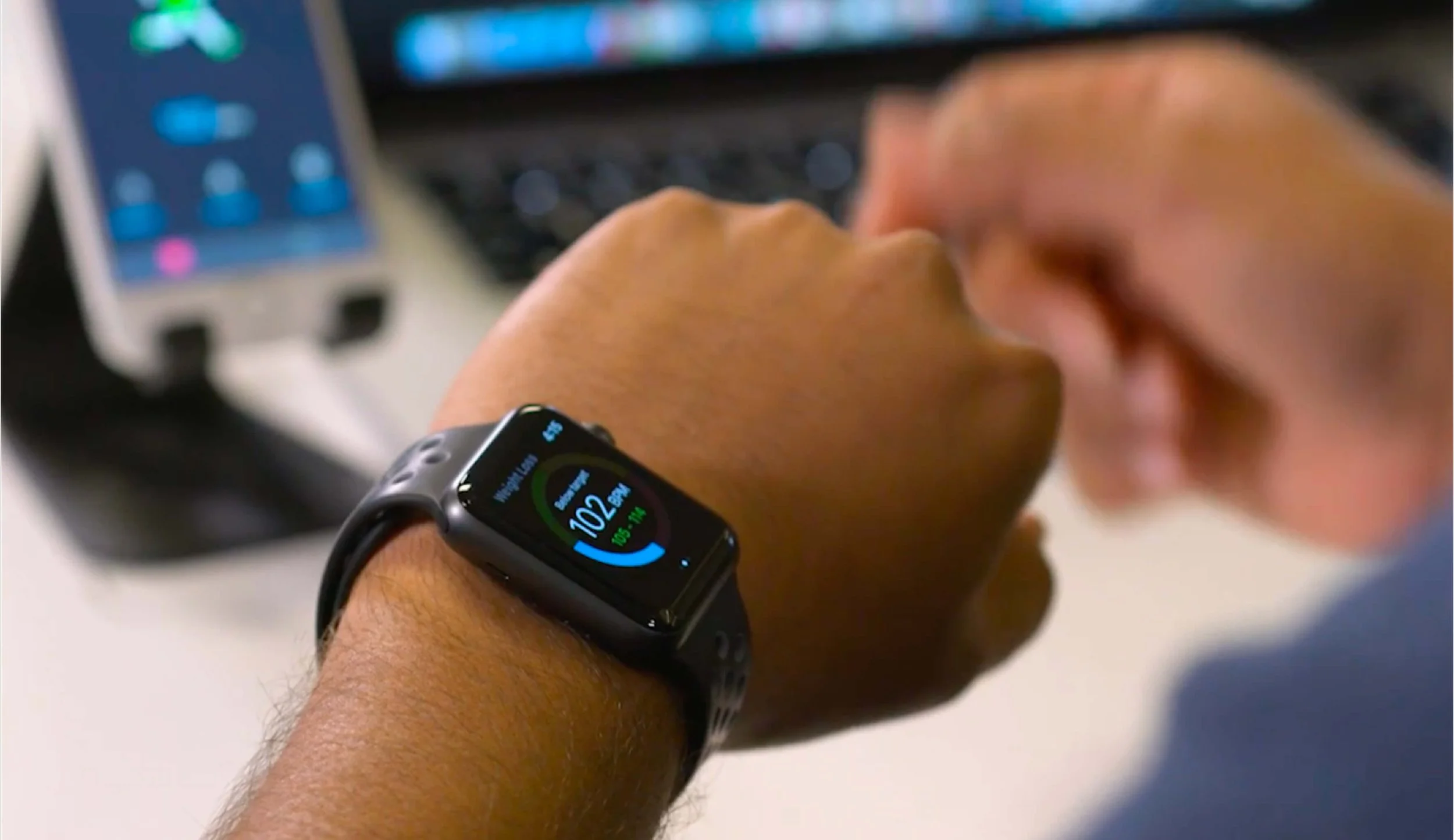
Final design
Demo of the RealFitness App by the Lead Engineer
Impact
After 3 months, we released RealFitness to the Satori community.
7% increase in user engagement
3% increase in account sign-ups
Increased demonstration of technological capabilities
Quotes
“The launch of Satori’s RealFitness is a testament to the power and flexibility of our real-time technology. Seeing it enable insights for seamless user experiences is exactly why we built this platform - to turn innovation into impact.”
“Real-time data is a game changer. It gives us the power to build responsive, intelligent experiences that adapt to users the moment they need it.”
“RealFitness unlocks new possibilities for developers.”
Learnings
Although there was temptation to add more features, remembering the intention of making it a bootstrap, and focusing on keeping the MVP scope control kept things on track.
Raw biometrics aren’t helpful without context. For ex. Users didn’t understand “Heart Rate: 172 bpm” without the context of their targeted selected range and the BPM to stay within.
Timeliness is more important than accuracy in Feedback. For ex. A 2-second delay in feedback feels broken. Even if the data is still “settling,” give early approximations and refine after.